
Rahul Hathwar · March 20, 2026
This article is a deep dive into the river flow and fish visualization systems I built for a KreekCraft-backed multiplayer game on Roblox. The worker NPC system that integrates with fishing, including the FSM, locomotion, and network architecture, is covered in a separate article. Context from that article helps but is not required here.
This project is under NDA. I'm writing with explicit permission from the studio and covering exclusively the systems I personally owned in design and implementation. I've kept game-specific design details to the minimum needed for context.
The game I was working on involved NPC workers that players could direct around the map: throw them to mining nodes, assign them to tasks, watch them operate. Fishing was one of those tasks. The spec I was given: a worker walks to a riverbed, fishes for a random amount of time, and carries whatever it caught back to the player's town hall. The initial brief was simple and focused on the core loop.
This article is about what I built beyond that, why I thought it was worth building, and how I went about it technically.
Core Mechanic First
Whenever I start a new feature, my priority is to build the minimum testable version before anything else. Not a prototype I'll throw away, but a versatile, thoughtful foundation. The reason is practical: gameplay mechanics are the ultimate decider of whether a feature is worth having at all. If the core loop isn't fun, no amount of visual polish saves it. So I build the core, get it playable, show the team something real, and then decide what to do next.
For fishing, that meant wiring up the FSM states (FishingIdle, FishingActive, ReelingFish, CarryingFish), writing a fish registry with configurable species data (name, stats, rarity) consistent with how I'd defined other item types in the codebase, and getting the full loop running: walk to river, fish, walk back, deliver. Once it was working, I sent the team a short video and a screenshot.
That pattern of frequent, observable updates is something I try to stick to in rapid development. A screenshot or a clip forces clarity about what's actually done versus what's in progress. It gives the team something to react to rather than a verbal description, and it shines a spotlight on design questions early, when they're cheap to fix. With the core approved I had earned some room to go further, and I knew exactly what I wanted to do with it.
Making It Configurable For the People Who'll Use It
Before I could build any of the flow math, I needed to figure out how to represent the river in a way that a designer could define and adjust without needing to understand what was happening underneath.
The river wasn't a simple shape. It had multiple sections, waterfalls, varying widths, elevation changes. I needed to let a designer say "here's the river" in terms they already understood, and then have the code handle everything else. I've done enough 3D work myself to know that the fastest way to configure something spatial is to just place it spatially.
So I blocked it out with colored BaseParts: bright red, semi-transparent parts for the river volume sections, and bright green parts for the riverbeds where workers would stand. Two distinct colors, visible at a glance in the Studio editor, with a naming convention (RiverBlock_A, RiverBed_P1_2_A) that captured the structure.
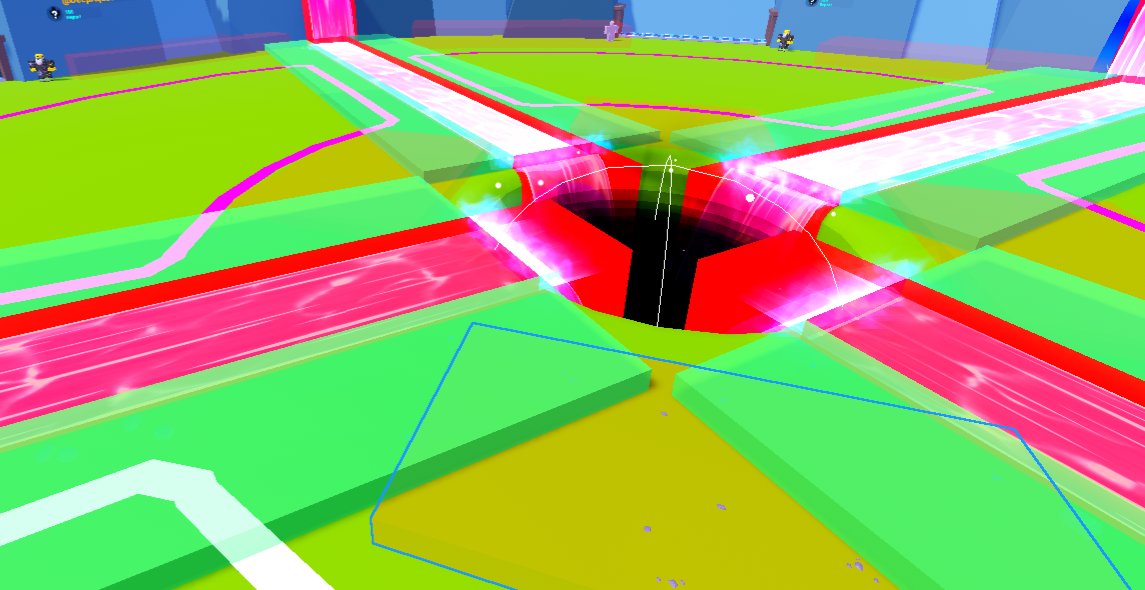
A designer who wanted to extend a river section just resized a red part. A new fishing spot was a new green part. Everything downstream of those decisions, the flow field construction, the block sequencing, the validation, I handle entirely in code.
This is something I end up caring about on most projects. I do 3D and 2D design on top of engineering, so I've spent time on both sides of the artist-programmer relationship. Systems that require artists to think like programmers tend to get misused or avoided. Systems that let artists work in their natural medium, visual, spatial, immediate, tend to actually get used correctly. I try to keep that in mind when deciding where complexity should live. I think what radicalized me was watching many of those Unreal Engine developer talks on this topic when I was younger. They shaped a lot of how I think about the programmer-artist relationship. Whether it's through config files, visual geometry, attributes, or a custom Studio plugin when genuinely needed, I try to abstract the complexity into code and leave the expressive parts to the people whose job is expression.
Proving the Concept: The Vector Field
Before I could generate fish paths, I needed to prove I could answer a more fundamental question: can I abstract this artist-placed assortment of BaseParts into an actual mathematical representation of flow?
I started by building a vector field.
The idea was to sample a 3D grid across all the river blocks and compute a flow direction at each sample point. Flow within a flat section points horizontally toward the downstream face. Flow within a waterfall points downward. At the boundaries between blocks, the field blends the two directions smoothly through a transition zone. The result, if it worked, would be a spatial field where any point in the river has a meaningful, continuous direction.
I built a debug visualization alongside it: colored arrows, placed in the 3D world, each pointing in the direction the computed flow said. I rendered this in Studio and looked at it.
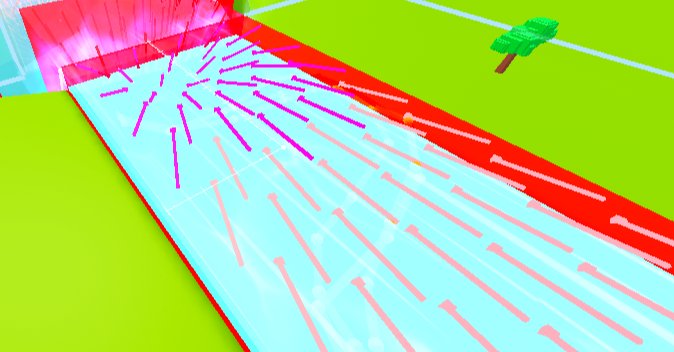
When the arrows lined up, when they smoothly transitioned through the waterfalls and curved correctly around bends, that was the confirmation I needed. The abstraction worked. I had turned a collection of visual blocks into a queryable flow field. Everything built afterward was built on top of that.
Building the Block Sequence
The vector field needed to know which block is upstream and which is downstream. That required solving the block sequencing problem.
My first instinct was to use each block's LookVector: the orientation of the part already points somewhere, use that to infer flow direction. The problem I didn't anticipate: the face connections between different block types don't line up cleanly. A flat block and a waterfall block where they meet have faces of completely different sizes. You can't just compare directions; you need to know whether the right faces are touching, and where exactly.
Finding the Connections
Face proximity was the answer. For every block, the algorithm identifies all other blocks whose upstream face center is within a tolerance radius of this block's downstream face center. That connection is directional by elevation: downstream means equal or lower Y, or a waterfall type. The block with the highest Y and no upstream neighbor becomes the sequence start, and from there the system follows the chain.
Classify each block:
  height > max(width, length) → WATERFALL
  otherwise → FLAT

For each FLAT block, find downstream face:
  Check all horizontal faces
  Is a touching block lower in elevation, or a waterfall? → that face is downstream.
  Opposite face is upstream.

For WATERFALL blocks:
  Top face = upstream (fish enters from above)
  Bottom face = downstream (fish exits below)

Link into sequence:
  Find block with no upstream neighbor and highest elevation → sequence start
  Follow nextBlock pointers to build ordered chain
At every step, the sequencing runs to completion at server startup. Either the chain builds successfully, or it breaks obviously with a warning that names exactly what failed and where. This is designed intentionally to promote early and obvious failures.
The Best Errors Are Loud, Early, and Consistent
There is a debugging philosophy I follow that this system illustrates clearly.
The river geometry is defined by an artist, placed by hand, and potentially misconfigured. This could maybe be a gap between blocks (there are no gaps in rivers!) or perhaps a block facing the wrong direction. It could be a waterfall too short for a classifier to identify it correctly. Any of these would corrupt the flow field and produce bizarre fish paths.
The system validates and constructs the full river representation at server startup, before any player joins. If anything fails, it fails there, immediately, consistently, with a human-readable message instead of five minutes into a playtest when a fish takes a wrong turn or silently, producing behavior nobody can explain. Instead, the system fails right at startup, every time, until someone fixes it.
The best errors are the ones that are blatant, in-your-face, and show up early. If an error is subtle, rare, or hard to reproduce, it's going to survive much longer than it should. Building systems that fail loudly on startup, particularly systems that depend on external data or configuration, is not defensive programming for its own sake. It is respect for your own and your team's time.
One-time startup computation has a second benefit: it's fast at runtime. The block sequence, the flow field, the sample paths: all computed once and reused. The path generator for each fish pull reads from already-built data structures instead of recalculation per event or scanning. This combination of early failure and zero runtime cost is, in my view, the only acceptable design for configuration-dependent infrastructure.
The Algorithmic Challenge: Timing the Path Backwards
This is the part I'm most proud of technically.
The catch time for any fishing session is determined the instant the worker starts fishing: a random value in a configured range (25 to 45 seconds). That number is fixed. The server knows when the fish will be caught before the fish has "appeared" in the game world.
I wanted players to see a fish model swim toward the worker before it's caught. Naturally. I wanted it to spawn upstream and arrive at exactly the moment of the catch. Not approximately. It has to be exact or what the player sees visually and what the player understands as the gameplay mechanics don't align.
That creates a constraint: the fish's path must be pre-calculated from the catch event backwards. I know when the fish arrives. I know how fast it swims. So I know how far upstream it must spawn. I trace backwards from the fishing spot, following the inverted flow field upstream, until I've covered the required distance. That's the spawn point.
The Math
baseSpeed = 7 studs/sec
avgMultiplier = average(FLAT_SPEED_MULTIPLIER, WATERFALL_SPEED_MULTIPLIER)
requiredDistance = swimDuration * baseSpeed * avgMultiplier

spawnPosition = TraceBackwards(fishingSpot, requiredDistance, blockSequence)
Then from the spawn point, I generate the forward swimming path, scale the per-segment time costs so they sum exactly to arrivalTime - spawnTime, and hand the waypoints to the client.
The client plays the waypoints as a local animation. There is no simulation taking place, real-time physics, or position updates over the network. The server sends the path once and the client plays it. If the deterministic timing holds, the fish arrives at the worker precisely when the server says it's caught.
The general notion of this architecture was clear from the beginning. The execution, in all its detail, took iteration. Working through it validated the approach. It was a success in the most straightforward sense: the idea was sound, the math worked out, and the fish arrived on time.
Modifier-Driven Path Aesthetics
A technically-timed fish is not enough. It still needs to look like it's swimming.
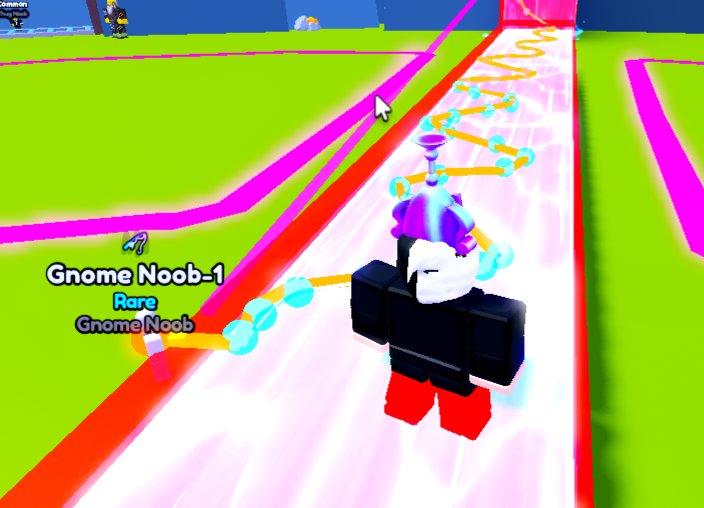
I structured the path generation as a sequence of layered modifier passes applied to the raw waypoints. Each pass adds one behavioral or aesthetic property, and each pass is independent of the others.
Personality. Each fish gets a randomly assigned personality: chaotic, controlled, or mixed. Personality determines the amplitude of the fish's lateral deviation from the flow axis. A chaotic fish carves wide S-curves across the full width of the river. A controlled fish barely deviates. A mixed fish sits in between. Personality is continuous across blocks so there is no reset at block boundaries.
Adaptive waypoint density. Near transitions between blocks (the last and first 10% of each block's length), waypoint spacing is tighter. In the middle of flat stretches, spacing is looser. This concentrates computation on the areas that need it (boundary blending) and keeps the waypoint count reasonable for efficient serialization.
Surface preference. In flat sections, fish are biased toward the top surface of the river block. This keeps them visible. Seventy percent of position blends toward the water surface. In waterfall sections, no bias is applied and fish follow the natural fall.
Wobble and bob. The final pass applies a sinusoidal horizontal wobble perpendicular to movement, and an independent vertical bob. Both are time-indexed from the spawn moment so there is no phase discontinuity as the fish crosses block boundaries.
Putting It Together
-- Applied in sequence to raw base waypoints:
applySurfacePreference(waypoints, blockSequence)
applyAestheticVariance(waypoints, spawnTime)
Each modifier is individually tunable from a constants file. Frequency, amplitude, bias ratio, personality amplitude per type: all configurable without touching code. Artist-friendly, even at the aesthetic layer.
The os.clock() Bug
Everything tested fine in Studio. I pushed the feature, ran it through a formal playtest, and the fish were visually arriving wildly off-time. The animations were wrong. Players saw fish arrive and nothing happened, or fish disappeared before the catch triggered. The whole visual sequence was broken.
os.clock() in Luau returns time since process start. On the server, it starts at server startup. On the client, it starts at client startup. In Studio's built-in test mode, server and client launch at essentially the same time. So os.clock() on both sides is nearly identical. In production, the client connects minutes or hours after the server started. The difference is enormous.
My original code was transmitting absolute os.clock() timestamps from the server. The client received them and compared them to its own os.clock(), which was living in a completely different timeline. The fish that was supposed to arrive in 30 seconds was instead due 4 hours ago, or 4 hours from now.
The fix: convert all absolute server timestamps to relative durations (seconds from packet-send time) before transmission. The client receives a number of seconds from now, not an absolute value. It re-anchors to its own clock on receipt.
-- Server: convert absolute timestamps to relative durations
local sendTime = os.clock()
for i, t in absoluteTimes do
    relativeTimes[i] = t - sendTime
end

-- Client: re-anchor to local clock
local receiveTime = os.clock()
local arrivalTime = receiveTime + data.arrivalTime
But the lesson that matters more is not the fix. The lesson is that this bug was completely invisible to me until a formal playtest, because Studio's test environment is not the actual environment. It is a convenience, and it has assumptions baked into it that production does not share.
The best test environment is always the final environment. That is, real servers, real clients, real network. The moment you accept that any other environment is "good enough," you are making a gamble. Something that works 99% of the time in Studio can silently break in the 1% that matters most. I didn't catch this bug until it broke the feature during a playtesting session everyone was watching.
That's the 1%. Always test in the final environment. At least once, on principle.
Pragmatic Choices and Known Tradeoffs
Not every decision in this system was elegant.
The river-to-plot assignment uses a naming convention: RiverBed_P1_2_A encodes that this riverbed belongs to plot 1, is segment 2, and connects to river A. Each river is shared between two plots. The server parses this convention at startup to determine ownership and validate fishing access.
Could this have been cleaner? Yes. CollectionService tags or Instance attributes would have been more robust: easier to validate, easier to extend, not dependent on a brittle string pattern. I didn't use them because I was under tight time pressure that week and the naming convention was already partially in place for the riverbed parts. I chose to work along the grain knowing it would mean producing an actual result over perfect. Because of course, it can't be perfect if it's not complete, and it won't get completed if I don't make concrete decisions at some point.
I document these decisions because I think they're honest. An engineer who assumes every decision was optimal is not one I think I'd fully be able to trust to make difficult tradeoffs. In high-pressure work environments, the task at hand often includes knowing when good enough is the right call, noting it clearly, and leaving the system in a state where someone can improve it when there's time.
What This Was For
The core mechanic took a day. The rest took slightly longer. What I want to leave you with is not just the technical feat behind the mechanic, but the personal principles I followed to bring it to life.
I built visual fish because I thought "an NPC stands at a river with a fishing rod" is inert as an experience. When you can watch a fish appear upstream and swim toward your worker, the mechanic becomes something you pay attention to. You can see it coming. As a player, you feel a small sense of anticipation. That anticipation wasn't in the spec initially. Not because it was wrong or unwanted, but because the reality of development sometimes is that ideas get written down quickly and the responsibility of iteration and fine tuning falls on someone else later.
I'm an engineer who cares about what things look like on screen. And that's not in spite of being a rigorous engineer. In fact, I think it's because of it. Good engineering and good craft share the same root in my point of view: deep investment in the quality of what you're making.
I built the fish because I wanted to, because I thought it mattered, and because the infrastructure I had designed was already capable of supporting it. The best systems are the ones that feel like they were designed for the features you add later, not against them.
The worker NPC system this integrates with, including the FSM, locomotion, grab-and-throw mechanic, and network architecture, is covered in the Worker NPC System article. The UI engineering and interface design for the same project is covered in the UI Systems article.